· Hamza · Productivity · 3 min read
Notion Review: Is It the Best Productivity App in 2026?
A complete Notion review covering features, pricing, pros, cons, AI capabilities, and whether it's the right productivity tool for students, teams, and businesses.
Notion Review: Is It the Best Productivity App in 2026?
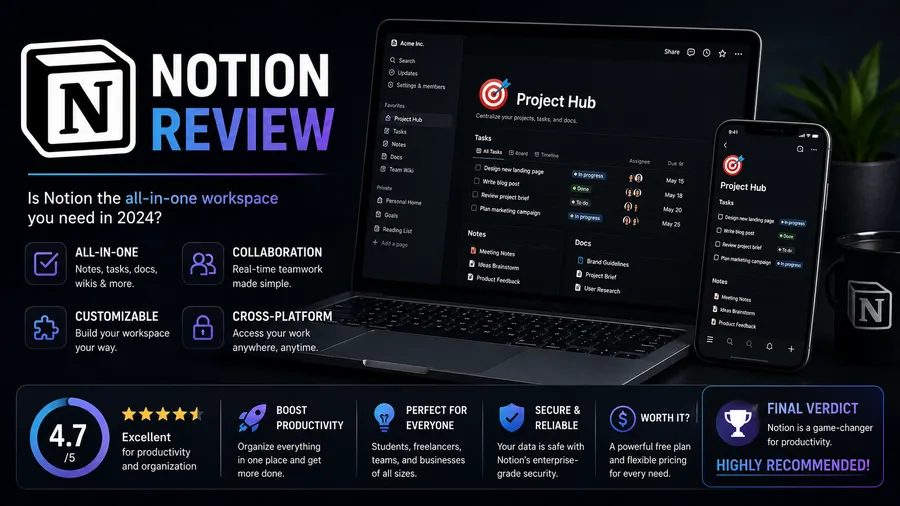
Notion has become one of the most popular productivity platforms in the world. Used by students, freelancers, startups, and large businesses, it combines note-taking, project management, documentation, databases, and AI-powered writing tools into one workspace.
But is Notion really worth using in 2026?
In this review, we’ll examine its features, pricing, strengths, weaknesses, and who should consider using it.
What Is Notion?
Notion is an all-in-one productivity workspace that allows users to:
- Take notes
- Create documents
- Manage projects
- Organize tasks
- Build databases
- Plan content calendars
- Collaborate with teams
- Use AI-powered writing tools
Instead of using multiple productivity apps, many users rely on Notion as a central workspace.
Key Features
Notion offers a wide range of features.
Some of the most useful include:
- Rich text editor
- Task management
- Kanban boards
- Tables and databases
- Calendar views
- Wiki pages
- Team collaboration
- Templates
- AI writing assistant
- Cross-platform synchronization
Its flexibility makes it suitable for many different workflows.
User Interface
One of Notion’s biggest strengths is its clean and modern interface.
Advantages include:
- Minimal design
- Easy navigation
- Drag-and-drop editing
- Custom page layouts
- Fast organization
Although beginners may need some time to understand advanced features, the interface becomes intuitive with regular use.
Notion AI
Notion AI is integrated directly into the workspace.
It can help users:
- Write articles
- Summarize documents
- Brainstorm ideas
- Generate meeting notes
- Improve grammar
- Translate text
- Rewrite content
These AI tools can significantly improve productivity.
Collaboration
Notion works well for teams.
Collaboration features include:
- Real-time editing
- Comments
- Mentions
- Shared workspaces
- Permission management
- Version history
These features make teamwork simple and efficient.
Templates
Notion includes hundreds of templates for:
- Personal planning
- Business management
- Project tracking
- CRM systems
- Habit tracking
- Student dashboards
- Finance tracking
- Content planning
Templates help users build organized workspaces quickly.
Performance
Overall performance is very good.
Notion offers:
- Fast synchronization
- Reliable cloud storage
- Stable editing
- Responsive mobile apps
Large databases may occasionally load more slowly, but performance is generally smooth.
Pricing
Notion offers multiple pricing plans.
Typically, users can choose between:
- Free plan
- Plus plan
- Business plan
- Enterprise plan
The free version includes enough features for many personal users, while businesses benefit from the advanced collaboration and administration tools available in paid plans.
Pros
Notion’s biggest advantages include:
- Beautiful interface
- Powerful organization tools
- Excellent note-taking experience
- Flexible databases
- AI integration
- Team collaboration
- Cross-platform support
- Large template library
- Frequent feature updates
Cons
Some limitations include:
- Learning curve for beginners
- Large workspaces can become complex
- Offline functionality is more limited than some competitors
- Advanced features may require a paid subscription
Despite these drawbacks, most users find the benefits outweigh the limitations.
Who Should Use Notion?
Notion is an excellent choice for:
- Students
- Freelancers
- Bloggers
- Software developers
- Startup founders
- Marketing teams
- Content creators
- Project managers
- Small businesses
Its flexibility makes it suitable for both personal and professional use.
Alternatives
Popular alternatives include:
- Microsoft OneNote
- Evernote
- Obsidian
- ClickUp
- Trello
- Asana
- Google Docs
Each platform has its own strengths depending on your workflow.
Frequently Asked Questions
Is Notion free?
Yes. Notion offers a generous free plan with enough features for personal use, while premium plans provide additional collaboration, storage, and administrative capabilities.
Is Notion good for students?
Yes. Many students use Notion for lecture notes, assignments, study planning, and organizing class schedules.
Can businesses use Notion?
Absolutely. Businesses use Notion for documentation, project management, internal knowledge bases, and team collaboration.
Is Notion AI worth it?
For users who frequently write, summarize documents, or brainstorm ideas, Notion AI can save time and improve productivity.
Is Notion worth using in 2026?
Yes. Notion remains one of the most powerful and flexible productivity platforms available, offering an excellent balance of note-taking, project management, collaboration, and AI-powered features.
Final Verdict
Overall Rating: ⭐⭐⭐⭐⭐ (4.8/5)
Notion is one of the best all-in-one productivity tools available today. Its combination of note-taking, project management, databases, collaboration features, and AI capabilities makes it suitable for individuals, students, and businesses alike.
Although new users may experience a slight learning curve, the platform’s flexibility and extensive feature set make it a worthwhile investment for anyone looking to stay organized and work more efficiently.