· Hamza · Reviews · 3 min read
Claude AI Review (2026): Features, Pricing, Pros, Cons & Is It Worth It?
A complete review of Claude AI by Anthropic, covering features, pricing, coding, writing, pros, cons, and whether it's worth using in 2026.

Claude AI Review (2026): Features, Pricing, Pros, Cons & Is It Worth It?
Artificial Intelligence assistants continue to improve at an incredible pace, and Claude AI, developed by Anthropic, has become one of the strongest alternatives to ChatGPT and Google Gemini.
Claude is known for its natural writing style, strong reasoning abilities, and impressive handling of long documents, making it popular among writers, developers, researchers, and business professionals.
In this review, we’ll explore Claude’s features, pricing, advantages, disadvantages, and whether it’s worth using in 2026.
What Is Claude AI?
Claude AI is a conversational AI assistant created by Anthropic, an AI company focused on building safe and reliable language models.
Claude can help users with:
- Writing
- Coding
- Research
- Summarizing documents
- Brainstorming
- Business planning
- Data analysis
- Translation
- Learning new topics
Its biggest strength is producing clear, thoughtful, and well-structured responses.
Key Features
Natural Writing
Claude generates high-quality content that feels natural and easy to read.
It performs well for:
- Blog posts
- Reports
- Emails
- Marketing copy
- Essays
- Documentation
Coding Assistance
Claude supports many programming languages including:
- Python
- JavaScript
- TypeScript
- Java
- C#
- Go
- PHP
- SQL
- HTML
- CSS
Developers use Claude to:
- Generate code
- Debug programs
- Explain complex concepts
- Refactor existing code
Large Context Window
One of Claude’s standout features is its ability to process long documents and maintain context across lengthy conversations.
This makes it particularly useful for:
- Research papers
- Legal documents
- Business reports
- Books
- Technical documentation
Document Analysis
Claude can analyze uploaded files and help users:
- Summarize PDFs
- Extract important information
- Explain complex documents
- Compare files
- Answer questions about uploaded content
Brainstorming
Claude is excellent for generating ideas for:
- Business startups
- Marketing campaigns
- Product names
- YouTube videos
- SEO strategies
- Content calendars
Performance
Writing
★★★★★
Claude is one of the best AI assistants for long-form writing and professional communication.
Coding
★★★★★
Produces clean code, explains errors clearly, and helps developers solve programming problems efficiently.
Research
★★★★★
Claude excels at organizing information and summarizing large amounts of text into clear explanations.
Creativity
★★★★☆
Claude generates creative ideas while maintaining a professional writing style.
User Interface
Claude offers a clean and distraction-free interface.
Users can:
- Start conversations
- Upload documents
- Continue previous chats
- Organize projects
- Ask follow-up questions
The interface is intuitive and suitable for both beginners and professionals.
Pricing
Claude offers a free version with access to core features, along with paid subscription plans that provide higher usage limits and access to more advanced AI models. Pricing and available plans may change over time.
Pros
- Excellent writing quality
- Strong reasoning abilities
- Large context window
- Great for long documents
- High-quality coding assistance
- Clean interface
- Fast responses
- Helpful document analysis
Cons
- Some advanced features require a paid subscription
- Responses should be verified for critical or sensitive decisions
- Availability of certain features may vary by region or account
Who Should Use Claude?
Claude is an excellent choice for:
- Writers
- Developers
- Researchers
- Students
- Business professionals
- Content creators
- SEO specialists
- Freelancers
- Consultants
Claude vs ChatGPT
| Feature | Claude | ChatGPT |
|---|---|---|
| Writing | ⭐⭐⭐⭐⭐ | ⭐⭐⭐⭐⭐ |
| Coding | ⭐⭐⭐⭐⭐ | ⭐⭐⭐⭐⭐ |
| Long Documents | ⭐⭐⭐⭐⭐ | ⭐⭐⭐⭐☆ |
| Creativity | ⭐⭐⭐⭐☆ | ⭐⭐⭐⭐⭐ |
| Image Generation | ⭐⭐⭐☆☆ | ⭐⭐⭐⭐⭐* |
| Ease of Use | ⭐⭐⭐⭐⭐ | ⭐⭐⭐⭐⭐ |
*Image generation depends on the available plan and features.
Frequently Asked Questions
Is Claude AI free?
Yes. Claude offers a free version, while paid plans provide additional capabilities and higher usage limits.
Is Claude good for coding?
Yes. Claude performs very well for programming, debugging, explaining code, and software development tasks.
Can Claude analyze PDFs?
Yes. Claude can analyze uploaded documents, summarize them, extract key information, and answer questions based on their contents.
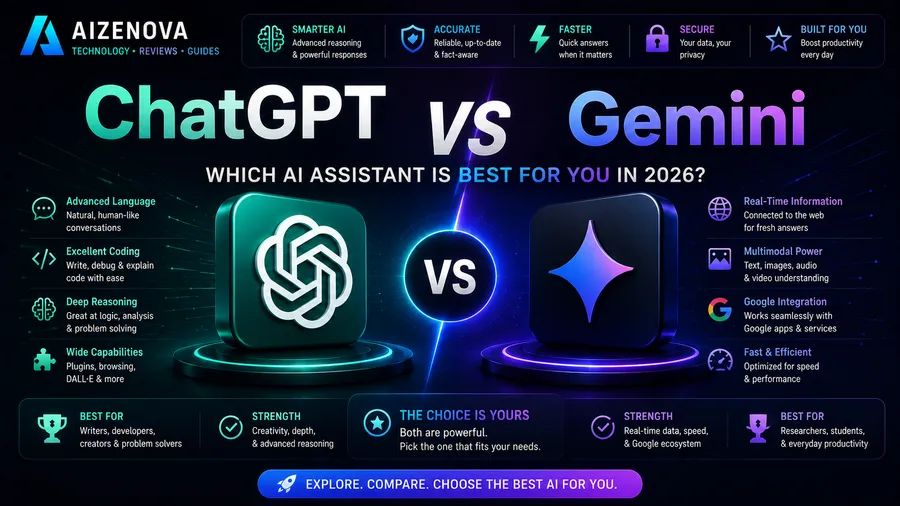
Is Claude better than ChatGPT?
It depends on your needs. Claude is particularly strong at handling long documents and producing polished writing, while ChatGPT offers a broader feature set that may include image generation, advanced productivity tools, and other capabilities depending on the plan.
Is Claude worth paying for?
If you regularly work with long documents, technical writing, research, or software development, a paid Claude subscription can provide significant productivity benefits.
Final Verdict
Rating: ⭐⭐⭐⭐⭐ (4.8/5)
Claude AI is one of the best AI assistants available in 2026. It combines excellent writing quality, strong reasoning, reliable coding support, and outstanding document analysis into an easy-to-use platform.
Its ability to understand long documents makes it especially valuable for researchers, professionals, and anyone working with large amounts of text. While it may not offer every feature available in competing AI assistants, Claude remains an excellent choice for users who prioritize high-quality writing, deep analysis, and thoughtful responses.