· Hamza · Technology · 4 min read
Cybersecurity Basics: A Beginner's Guide to Staying Safe Online
Learn the fundamentals of cybersecurity, common cyber threats, best security practices, and how to protect your personal and business data.
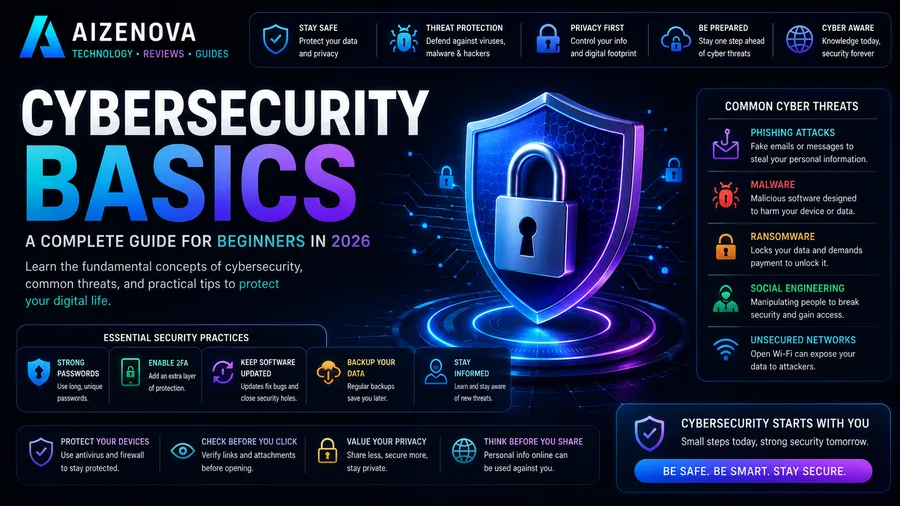
Cybersecurity Basics: A Beginner’s Guide to Staying Safe Online
Cybersecurity has become one of the most important aspects of modern technology. Every day, individuals and businesses face cyber threats that target personal information, financial data, and digital systems.
Understanding the basics of cybersecurity helps protect your devices, accounts, and sensitive information from hackers and online attacks.
In this guide, you’ll learn what cybersecurity is, common threats, and practical steps to stay safe online.
What Is Cybersecurity?
Cybersecurity is the practice of protecting computers, smartphones, networks, servers, and data from unauthorized access, attacks, or damage.
Its main goals are to:
- Protect personal information
- Prevent cyber attacks
- Secure online accounts
- Keep business systems running
- Maintain privacy
Cybersecurity combines technology, policies, and user awareness to reduce security risks.
Why Cybersecurity Matters
Cyber attacks can lead to:
- Identity theft
- Financial loss
- Data breaches
- Business disruption
- Reputation damage
- Loss of sensitive information
As more activities move online, protecting digital assets has become essential.
Common Cyber Threats
1. Phishing
Phishing is a scam where attackers pretend to be trusted organizations to steal sensitive information.
They may ask for:
- Passwords
- Credit card numbers
- Banking information
- Verification codes
Always verify emails and websites before entering personal information.
2. Malware
Malware is malicious software designed to harm devices or steal data.
Common types include:
- Viruses
- Worms
- Trojans
- Spyware
- Adware
Installing trusted antivirus software and keeping systems updated helps reduce the risk.
3. Ransomware
Ransomware encrypts files and demands payment to restore access.
Organizations often become targets because losing access to critical data can disrupt operations.
Regular backups are one of the best defenses against ransomware.
4. Password Attacks
Weak or reused passwords make accounts easier to compromise.
Examples include:
- Brute-force attacks
- Credential stuffing
- Dictionary attacks
Using strong, unique passwords greatly improves security.
5. Social Engineering
Instead of attacking computers, social engineering targets people.
Attackers manipulate victims into revealing confidential information through deception and trust.
Awareness is one of the strongest defenses.
Essential Cybersecurity Best Practices
Use Strong Passwords
Create passwords that:
- Are at least 12 characters long
- Include uppercase and lowercase letters
- Include numbers
- Include special characters
- Are unique for every account
A password manager can help generate and store secure passwords.
Enable Multi-Factor Authentication (MFA)
MFA adds an extra verification step beyond your password.
Even if a password is stolen, MFA makes unauthorized access much more difficult.
Keep Software Updated
Software updates often include important security patches.
Regularly update:
- Operating systems
- Browsers
- Mobile apps
- Antivirus software
Automatic updates are recommended whenever possible.
Be Careful with Emails
Never click suspicious:
- Links
- Attachments
- Downloads
Verify the sender before responding to unexpected messages.
Use Secure Wi-Fi
Avoid accessing sensitive accounts on unsecured public Wi-Fi.
If necessary, use a trusted VPN to encrypt your internet connection.
Back Up Important Data
Regular backups help recover information after:
- Hardware failure
- Ransomware attacks
- Accidental deletion
Store backups in multiple secure locations when possible.
Antivirus Software
Modern antivirus programs help detect and remove threats before they cause damage.
Good antivirus software can provide:
- Real-time protection
- Malware detection
- Web protection
- Email scanning
- Firewall integration
Remember that antivirus software is only one part of a complete security strategy.
Cybersecurity for Businesses
Businesses should also:
- Train employees
- Limit user permissions
- Monitor network activity
- Encrypt sensitive data
- Create incident response plans
- Perform regular security audits
Human error remains one of the leading causes of security incidents.
Cybersecurity Careers
Cybersecurity professionals are in high demand worldwide.
Popular roles include:
- Cybersecurity Analyst
- Security Engineer
- Penetration Tester
- Incident Response Specialist
- Security Consultant
- Cloud Security Engineer
- Ethical Hacker
- Chief Information Security Officer (CISO)
The field offers strong career opportunities across many industries.
Frequently Asked Questions
What is the biggest cybersecurity threat?
Phishing remains one of the most common and effective cyber threats because it targets human behavior rather than software vulnerabilities.
Is antivirus enough?
No. Antivirus software is important, but it should be combined with strong passwords, MFA, regular updates, backups, and safe browsing habits.
What is MFA?
Multi-Factor Authentication (MFA) requires two or more forms of verification before granting access to an account, significantly improving security.
How often should I change my passwords?
Rather than changing passwords on a fixed schedule, use strong, unique passwords for every account and update them immediately if you suspect they have been compromised.
Is cybersecurity a good career?
Yes. Cybersecurity is one of the fastest-growing technology fields, with strong demand for skilled professionals across government, healthcare, finance, and private industry.
Conclusion
Cybersecurity is no longer optional—it is a fundamental part of using the internet safely. Whether you’re protecting personal accounts or securing a business, understanding common cyber threats and following basic security practices can greatly reduce your risk.
By using strong passwords, enabling multi-factor authentication, keeping software updated, and staying alert to phishing scams, you can build a strong foundation for protecting your digital life.